Definition and Role
Definition:Web crawling (or “spidering”) is the process of systematically browsing the World Wide Web, typically for the purpose of web indexing.
The Crawler:A software bot (also called a spider or web robot) that visits web pages to gather information, starting from a list of “seed” URLs.
Role in Search Engines:
Discovery:Finds new and updated pages to add to the search engine’s index.
Indexing:Extracts content (text, links, images) from pages to build the searchable index.
Freshness:Revisits pages to check for changes, keeping the index up-to-date.
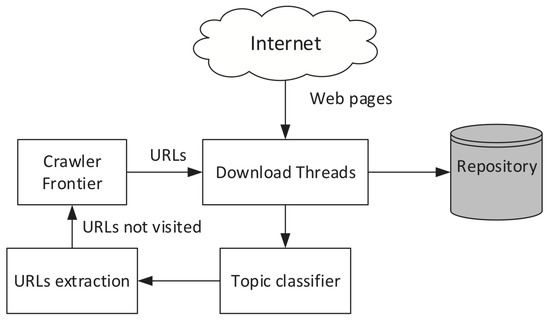
Core Crawling Strategies
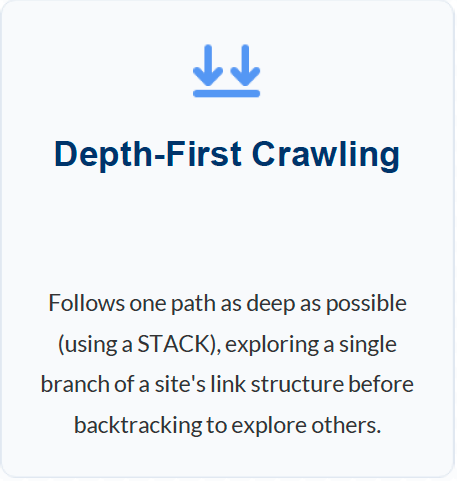
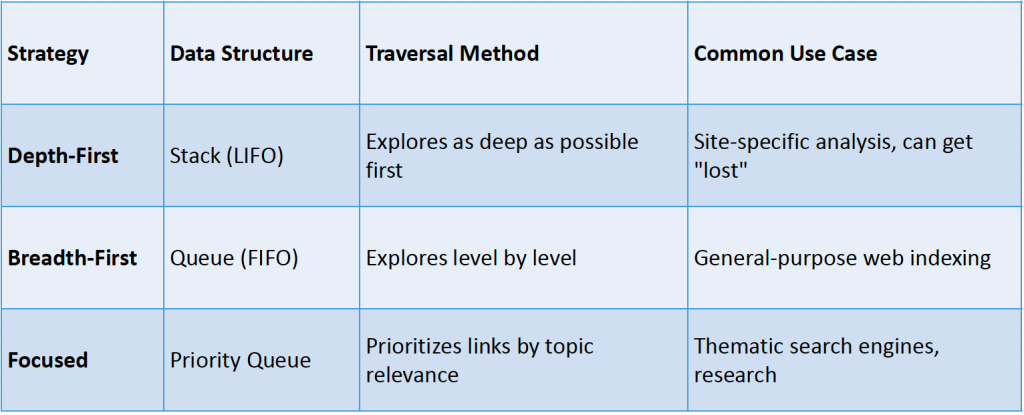
Deapth-First Crawling
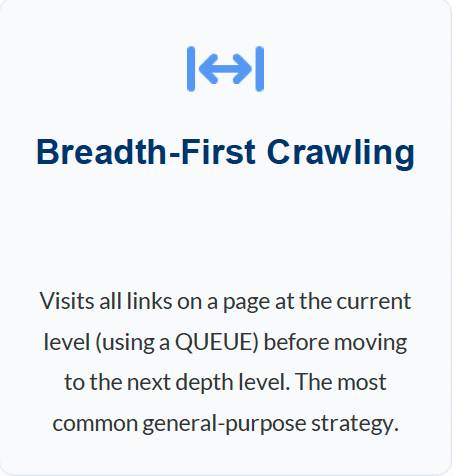
Breath-First Crawling
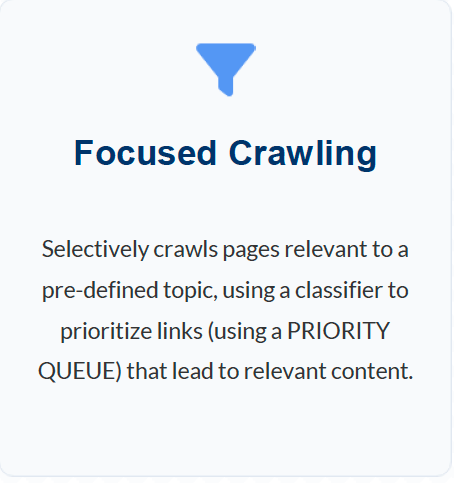
Focused Crawling
Crawling Strategies: Comparison
Features a Crawler Must Provide
Feature 1: Politeness & Compliance
Goal:To minimize server load, respect site owner wishes, and maintain a good relationship with the web community.
robots.txt:The crawler must first check for and obey the Robots Exclusion Protocol. A Disallow: rule tells the crawler which parts of a site *not* to visit.
Crawl-Delay:Adhering to Crawl-Delay directives in robots.txt or using adaptive throttling to avoid overloading a web server. This is critical to avoid being banned.
User-Agent Handling:Clearly identifying the crawler via its User-Agent string (e.g., Googlebot/2.1) allows site administrators (webmasters) to set specific rules for specific bots.
Feature 2: Robustness and Error Handling
- Fault Tolerance:The system must be designed to withstand component failures (network outages, machine crashes) without losing track of which URLs have been processed or are pending.
- Retry Logic:Implementation of smart, time-delayed retries (often using exponential backoff) for transient HTTP errors (like 503 Service Unavailable) to recover data when the server returns.
- Handling Malformed HTML:The parser must be robust enough to handle “tag soup”—broken tags, missing elements, and non-standard markup—to successfully extract content and outgoing links from messy real-world web pages.
Feature 3: Scalability for the Global Web
- Large-Scale Operation:A modern crawler must be able to fetch billions of pages from millions of different web hosts.
- Distributed Systems:This is not feasible on a single machine. Scalability is achieved by distributing the crawl across many machines (nodes).
- Key Components:
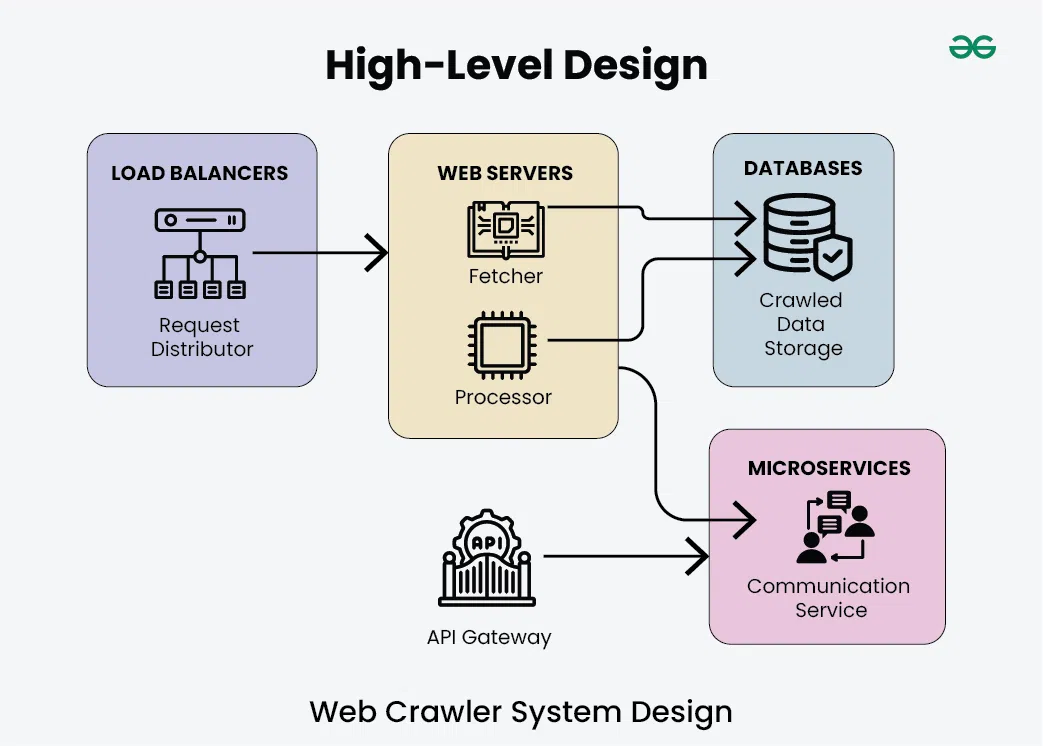
- URL Frontier:Manages the list of all URLs to be crawled.
- Fetchers:Parallel processes that download pages.
- Parsers:Parallel processes that extract new links.
Feature 4: URL Normalization and Duplication
Goal:Avoid redundant fetches of the same content. URLs are normalized to a canonical (standard) form *before* being checked for duplication.
- URL Normalization:Converts syntactically different URLs that point to the sameresource into a single, canonical form.
- Examples:Converting hostnames to lowercase, removing default ports (:80), and sorting query parameters.
- URL Deduplication:Using fast, space-efficient data structures (like Bloom Filters) to check the normalized URL against the set of already crawled pages, preventing redundant fetches and endless loops.
- Content Deduplication:Comparing the content of two different URLs to detect and eliminate duplicate copies, ensuring the index is efficient and free of boilerplate content.
| Normalization Type | Original URL | Normalized URL |
| Lowercase Host | http://ExAmPlE.com/ | http://example.com/ |
| Remove Default Port | http://example.com:80/ | http://example.com/ |
| Resolve Path Traversal | http://example.com/a/b/../c/ | http://example.com/a/c/ |
| Sort Query Parameters | http://example.com/?b=2&a=1 | http://example.com/?a=1&b=2 |
Feature 5: Content parsing and link extraction
1-Content Parsing (Goal: Prepare for Indexing)
The goal here is to isolate the meaningful content of the page from the markup and surrounding noise so it can be added to the search engine’s index.
- Extraction:Separating the textual content (the actual articles, descriptions, or information) from the HTML tags, JavaScript code, and CSS styles.
- Normalization:Cleaning up the extracted text, resolving character encodings, and handling specific document types (like converting a PDF into searchable text).
Metadata Harvesting:Collecting important information about the page, such as the title (<title>), meta description, and keywords, which are crucial for ranking and snippet generation.
Content parsing and link extraction
2-Link Extraction (Goal: Feed the Crawler)
The goal here is to identify and process every outgoing hyperlink on the current page to ensure the crawler can continue traversing the web.
- Discovery:Finding all anchor tags (<a href=”…”>) and other elements that contain links (like image sources, if needed) within the parsed document.
- Resolution:Converting relative URLs(e.g., /products/new.html) into absolute, fully qualified URLs (e.g., http://example.com/products/new.html) so they can be accurately added to the URL frontier.
- Filtering:Checking the extracted links against rules (like those found in robots.txt or nofollowattributes) to ensure the crawler only queues URLs it’s allowed to visit.
In essence, parsing and extraction serve as the bottleneck between downloading the raw bytes and making decisions about what to index and where to go next.
Features a Crawler Should Provide
Focused Crawling
Goal:To selectively crawl and index pages that are relevant to a specific, pre-defined topic (e.g., “health,” “finance”), saving resources.
- Mechanism:It replaces the simple FIFO (Breadth-First) queue with a Priority Queue.
- Prioritization:A machine learning classifierscores unvisited URLs based on their predicted relevance to the topic (using features like anchor text, keywords in the link, etc.).
- Process:High-scoring links are prioritized in the queue, guiding the crawler to stay on-topic and avoid irrelevant parts of the web.
Use Case:Vertical search engines (e.g., a medical search engine), academic research, building specialized knowledge bases.
Freshness & Recrawl Policies
- The Challenge:The web is dynamic. Content is constantly added, updated, and deleted. A “stale” index is a low-quality index.
- The Goal:To maintain a “fresh” index by revisiting pages to check for changes.
- Problem:It is impossible and impolite to recrawlthe entire web constantly.
- Solution (RecrawlPolicy):
- Uniform Policy:Revisit all pages at the same rate (inefficient).
- Proportional Policy (Smarter):Revisit pages based on their estimated frequency of change. News sites are recrawledfrequently (minutes/hours), while static pages are recrawledrarely (weeks/months).
- Prioritization:High-importance pages (e.g., high PageRank) are also prioritized for recrawlingto ensure the most important content is the freshest.
Spam & Trap Avoidance
- The Adversarial Web:Not all web content is benign; some is designed to deceive or trap crawlers.
- Crawler Traps (Spider Traps):
- Infinite Loops:Dynamically generated pages that create an endless “tree” of links (e.g., a calendar with a “next day” link that goes on forever).
- Honeypots:Pages built specifically to trap bots with a massive number of (often invisible) links.
- Heuristics for Avoidance:
- Setting a maximum crawl depth or URL length.
- Detecting path repetition (e.g., /shop/shop/shop/…).
- Using URL normalization to collapse similar, “spammy” URLs.
- Cloaking:Detecting when a server provides different content to the crawler (based on User
Metadata Extraction
Goal:To extract data abouta page, which is often as important as the content onthe page for indexing and ranking.
Key Metadata:
- Anchor Text:The clickable text of an incoming link (e.g., <a href=”page_B.html”>This is anchor text</a>). This text, found on Page A, is stored as a powerful, objective descriptor for Page B.
- Page Titles:The content of the <title>tag. A primary signal for the page’s main topic.
- HTTP Headers:Caching information (Last-Modified, ETag), content type (Content-Type), and redirect status (301, 302) are all stored to manage the crawl.
Support for Dynamic Content
- The Challenge (The Modern Web):Many pages load as a minimal HTML “shell” and then use JavaScript (JS) to fetch and display all the real content (via AJAX, etc.).
- Problem:A simple “fetch-and-parse” crawler only sees the initial, often-empty, HTML file. It misses all the content loaded by JavaScript.
Solution (JavaScript Rendering):
- The crawler must act like a full web browser.
- It loads the page into a headless browser(e.g., Chromium).
- It executes the JavaScript, waits for network calls to complete, and then parses the final, rendered HTML DOM(Document Object Model).
- Limitation:This is extremely resource-intensive (CPU, memory, time) and is a major bottleneck for modern crawlers.
The Modern Crawler: Key Challenges
- The modern web crawler has evolved from a simple “fetcher” into a complex, intelligent, and resource-intensive system.
- It must balance multiple competing goals:
- Efficiency vs. Completeness: Using simple HTML parsing for most pages but knowing when to deploy expensive JavaScript (JS) rendering.
- Speed vs. Politeness: Crawling as fast as possible to maintain freshness, but respecting robots.txtand Crawl-Delayto remain a “good” bot.
- Trust vs. Verification:Ingesting content while actively filtering out spam, traps, and deceptive cloaking techniques.
- These advanced features are what separate a simple script from a petabyte-scale search engine.
Crawler Architecture
Modular Crawler Architecture
Goal:To build a large-scale system that is scalable, fault-tolerant, and maintainable. This is achieved through a “separation of concerns.”
- •The Four Core Modules:
- •Scheduler (URL Frontier):The “brain.” Decides whichpage to crawl next and when.
- •Fetcher:The “legs and hands.” Responsible for downloading the raw content (HTML, PDF, etc.) from a given URL.
- •Parser:The “eyes and mind.” Responsible for reading the downloaded content, extracting the usable text, and discovering all new (outgoing) links.
- •Storage:The “memory.” A set of databases that store the crawled content (document index), link relationships (link database), and metadata.
- •The Flow:The Scheduler gives a URL to the Fetcher. The Fetcher’s content goes to the Parser. The Parser’s extracted links go back to the Scheduler, and the extracted text goes to Storage.
The URL Frontier (Scheduler)
Definition:The central data structure that manages all URLs the crawler knows aboutbut hasn’t crawled yet. It can contain billions of URLs.
- Key Responsibilities:
- Prioritization:It’s not a simple queue. It’s a Priority Queuethat uses scoring functionsto decide what to crawl next.
- Politeness:It must manage per-host queues to ensure it doesn’t hit the same web server too rapidly (obeying Crawl-Delay).
- Scoring Inputs (How Priority is Set):
- Importance:Is the page a high PageRank site? (Crawl it sooner).
- Freshness:Is this a news site that changes often? (Recrawlit often).
- Topic:Is it relevant to a focused crawl? (Score it higher).
Content Filters (The Gatekeeper)
- Goal:To save processing (CPU) and storage resources by discarding unwanted content as early as possible.
- Filter 1: MIME Type Filtering (Pre-Parse):
- What:Checks the Content-Typeheader (e.g., text/html, application/pdf, image/jpeg).
- Action:If text/html, send to the HTML parser. If application/pdf, send to the PDF-to-text converter. If video/mp4or .zip, discard.
- •Filter 2: Language Detection (Post-Parse):
- What:Analyzes the extracted text to identify its natural language.
- Action:If the search engine only serves English-speaking users, pages identified as 100% Russian or Mandarin may be discarded.
- Other Filters:Spam detection, duplicate content detection, etc.
Threading & Concurrency (The Engine)
- The Problem:Crawling is I/O-bound. The single slowest part is waiting for a remote server to respond over the network. The CPU sits idle 99% of the time.
- The Solution: Concurrency.Do thousands of things at once.
- Approach 1: Multi-threaded Fetchers:
- Run hundreds or thousands of “fetcher” threads in parallel.
- While Thread 1 is waitingfor Server A, Thread 2 is requestingfrom Server B, and Thread 3 is processingdata from Server C.
- Approach 2: Asynchronous (Non-Blocking) I/O:
- The modern, more efficient model.
- A single process can manage thousands of open connections. It issues a request, then immediately moves to another task, handling responses as they arrive (event-driven). This maximizes CPU and network efficiency.
Architecture in Motion (The Full Flow)
This slide shows how all the modules work together:
- The URL Frontier selects a high-priority, polite URL.
- A free Fetcher Thread(using AsyncI/O) makes the HTTP request and downloads the raw content.
- The MIME Type Filter checks the content. If it’s text/html…
- A Parseris assigned to read the HTML, extract the clean text, and find all <a> (link) tags.
- The Language Detection Filterchecks the clean text. If it’s a valid language…
- The Clean Text & Metadataare sent to Storage(the Index).
- The Extracted Linksare sent back to the URL Frontierto be scored, prioritized, and added to the queue for future crawling.
DNS Resolution
DNS Resolution: The Crawler’s “Address Book”
- Role in Crawling:The crawler’s main job is to fetch content from URLs. A URL contains a hostname(e.g., www.example.com), but the internet works on IP addresses(e.g., 93.184.216.34).
- The “First Step”:Before a crawler can open a network connection to a web server, it mustuse the Domain Name System (DNS) to resolve the hostname into its corresponding IP address.
- Process:
- Crawler takes URL: http://www.example.com/page.html
- Extracts hostname: www.example.com
- Performs DNS Lookup: www.example.com-> 93.184.216.34
- Opens connection to 93.184.216.34and requests /page.html.
- Conclusion:DNS resolution is a fundamental, non-negotiable prerequisite for fetching content from any new host.
Caching Strategies to Reduce Latency
- The Bottleneck:Performing a full DNS lookup for every single URLwould be disastrously slow. At the scale of billions of pages, this latency would kill crawl performance.
- The Solution: Caching.A high-performance crawler maintains its own large, internal DNS cache (often in-memory).
- How it Works:
- The crawler looks up example.comand gets 93.184.216.34. It stores this mapping in its cache.
- For the next 10,000 URLsfrom example.com, the crawler looks in its local cache first, getting the IP address almost instantly (in nanoseconds).
- This bypasses the need for any external network lookups.
- Time-To-Live (TTL):The cache must still respect the TTL (e.g., “this IP is valid for 1 hour”) set by the domain. This ensures the crawler adapts if a site’s IP address changes.
Handling DNS Failures and Timeouts
- The Internet is Unreliable:DNS servers can fail, packets get lost, and domains expire. A robust crawler must handle this gracefully.
- Common Failures:
- Timeout:The DNS server did not respond in time. This is a transienterror.
- NXDOMAIN(Non-Existent Domain):A permanent error. The domain name is invalid or has expired.
- SERVFAIL(Server Failure):The DNS server is misconfigured or down. This is transient.
- Crawler’s Retry Logic:
- NXDOMAIN: Mark the domain as “dead” and remove all its URLs from the frontier (or de-prioritize for 1 year).
- Timeouts / SERVFAIL: Do not delete the URLs. This is a temporary problem. The crawler should log the error, de-prioritize the host, and schedule a retry for several hours or days later.
Impact on Crawl Throughput
- Throughput = Pages per Second.This is the #1 metric for a crawler’s efficiency.
- Direct Impact:DNS is often the main bottleneck before the fetcher threads can even start their work.
- High Throughput (Good):A large, fast, in-memory DNS cache makes hostname-to-IP resolution instantaneous. This allows the fetcher threads to run at full capacity, limited only by network speed and politeness delays.
- Low Throughput (Bad):A small or non-existent cache forces fetchers to waitfor DNS lookups. The entire crawl grinds to a halt.
- Example:At scale, a crawler’s internal DNS resolver may handle millions of queries per second, while a standard DNS server can only handle thousands.
Impact on Crawl Reliability
- Reliability = Completeness and Uptime.Does the crawler find all the content and never stop running?
- DNS Failures:How the crawler handles DNS failures directly impacts its reliability.
- Unreliable Crawler (Bad):
- Treats a temporary DNS timeout as a permanent failure.
- Deletes a valid website from its frontier just because the DNS server was down for 10 minutes.
- The resulting index is incompleteand missing large chunks of the web.
- Reliable Crawler (Good):
- Differentiates between permanent (NXDOMAIN) and temporary (timeout) errors.
- Uses smart retry logic to revisit temporarily failed hosts.
- The resulting index is more completeand accurately reflects the state of the web, even the parts that are temporarily hard to reach.
The URL Frontier
What is The URL Frontier?
Definition:The URL Frontier is the central data structure that manages all the URLs a crawler intends to crawl or recrawl. It’s the crawler’s main “to-do list.”
- Core Task:It acts as the scheduler, deciding whichURL a free fetcher thread should crawl next.
- Key Challenges:
- Scale:It must manage billionsof URLs.
- Efficiency:It must select and dispatch URLs with high throughput.
- Prioritization:It must decide which pages are more important to crawl first.
- Politeness:It must ensure the crawler doesn’t hit the same server too quickly.
Frontier Data Structures
The “Queue” is not one, but many.A large-scale frontier is a complex set of queues.
- 1. Per-Host Queues (For Politeness):
- The frontier is first divided into many separate FIFO (First-In, First-Out)queues, one for each hostname.
- When the crawler picks a host, it pulls the next URL from that host’s FIFO queue. This naturally enforces politeness delays (e.g., “wait 1 second before pulling from this queue again”).
- 2. Priority Queue (For Scheduling):
- A main Priority Queueis used to decide whichper-host queue to visit next.
- This queue is not based on time, but on a score(e.g., PageRank, freshness). It ensures the crawler’s time is spent on high-value hosts.
- 3. Bloom Filters (For Memory):
- A probabilistic data structure used to quickly answer: “Have I everseen this URL before?”
- It prevents duplicate URLs from being added to the frontier, saving memory and preventing re-work, with a very small chance of error.
URL Scoring & Prioritization
Goal:To crawl a “better” version of the web faster by assigning a priority score to each URL. This score determines its position in the priority queue.
Key Scoring Inputs:
- Link Popularity (e.g., PageRank):High-PageRank URLs are considered more important and are given a higher priority. This is based on the idea of crawling the “best” pages first.
- Freshness:Pages that are known to change frequently (like news homepages or stock tickers) are given a higher priority for recrawling.
- Relevance (for Focused Crawls):In a topical crawler, a machine learning classifier scores URLs based on their predicted relevance to the topic. On-topic links get a high-priority score.
- History:Pages that have historically returned errors or spam are given a very low priority.
Duplicate Detection & Canonicalization
- This is Step 0.Before a URL is everadded to the frontier, it must be “cleaned” and “checked.”
- Canonicalization (Normalization):
- The process of converting a URL into its single, standard (canonical) form.
- Examples:
- HTTP://Example.com/-> http://example.com/(lowercase host)
- http://example.com:80/-> http://example.com/(remove default port)
- http://example.com/a/../b/-> http://example.com/b/(resolve path)
- Duplicate Detection:
- After canonicalization, the crawler checks if this standardized URL already exists
- (in the frontier or in the “already crawled” database).
- This is where Bloom Filtersor Hash Sets are used for a very fast,
- memory-efficient check to prevent redundant work.
Frontier Expansion Strategies
- The frontier’s logic definesthe crawl strategy.How you store, prioritize, and retrieve URLs dictates the “shape” of your crawl.
- Breadth-First (BFS):
- How:Using a simple, single FIFO Queue(First-In, First-Out).
- Result:The crawler explores the web level by level. It finds all pages 1 click from the seed, then all pages 2 clicks away, etc. This is the most common and “safest” strategy.
- Depth-First (DFS):
- How:Using a LIFO Stack(Last-In, First-Out).
- Result:The crawler follows a single link path as deep as it can go. This is rarely used as it gets “lost” in deep sites and crawler traps.
- Focused:
- How:Using a Priority Queuewhere the score is topic relevance.
- Result:The crawler prioritizes links that seemrelevant, ignoring paths that appear to be off-topic.
Distributing Indexes
Why Distribute an Index?
The Problem:A single machine cannot handle the scale of a modern search index.
- Storage Limits (The “Size” Problem):
- The inverted index for billions (or trillions) of documents is petabytes in size.
- This vastly exceeds the disk space, RAM, and CPU of any single server.
- Query Throughput (The “Speed” Problem):
- A large search engine must handle tens of thousands of queries per second (QPS).
- A single machine cannot serve this many requests, especially when each query requires complex-list lookups and scoring.
- The Solution:
- Horizontal Scaling:Instead of one “supercomputer,” use a cluster of thousands of cheaper “commodity” machines working in parallel.
- This requires partitioning(splitting) the index and query work across the cluster.
Partitioning Strategies
Goal: To split the giant inverted index into smaller, manageable pieces.
- Strategy 1: Document-Based Partitioning (or “Sharding”)
- How: The collection of documents is split into N partitions (shards). Each shard holds a complete, independent index for its subset of documents.
- Query: The query is sent to all N shards in parallel. A broker node then gathers and merges the results from all shards.
- Pro: Simple, easy to add new documents. This is the model used by Elasticsearch/Solr.
- Strategy 2: Term-Based Partitioning
- How: The dictionary of terms is split. Shard A holds terms a-f, Shard B holds g-m, etc. Each shard holds the full posting lists for its terms.
- Query: A query (e.g., “web search”) is split. The “web” term goes to Shard W, “search” goes to Shard S.
- Pro: Very efficient for querying, as you only contact the shards that hold your terms. Con: More complex to manage and update.
Shardingand Replication
These are two distinct but related concepts for horizontal scaling.
- Sharding(Partitioning):
- What:The process of splitting your data (the index) across multiple machines. This is what solves the storage (size) problem.
- Benefit:Allows the index to grow to any size by simply adding more machines (shards). It also parallelizes query work.
- •Replication:
- What:The process of making copies(replicas) of your shards on different machines.
- Benefit 1: Fault Tolerance:If a machine holding a primary shard fails, its replica on another machine is instantly promoted, and no data or query capability is lost.
- Benefit 2: High Throughput:Query load can be balanced across all replicas, allowing the cluster to handle a much higher volume of queries per second (QPS).
MapReducefor Index Construction
Problem: How do you build a petabyte-scale inverted index in parallel?
MapReduceis a programming model designed for this exact task.
- MAP Phase (Parallel Tokenization):
- Input: (DocID, Document Content)
- Many “Map” workers run in parallel, each on a small chunk of documents.
- Each worker tokenizes its documents and emits (key, value) pairs of: (term, DocID)
- Example: (‘search’, D1), (‘engine’, D1), (‘search’, D2)
- SHUFFLE Phase:The system automatically sorts and groups all pairs by key (the term).
- REDUCE Phase (Posting List Generation):
- Input: (term, [list_of_DocIDs])
- Each “Reduce” worker takes one term (e.g., ‘search’) and its entire list of document IDs ([D1, D2, D50, …]).
- It then sorts, compresses, and writes the final posting list for that term to disk.
Index Consistency & Synchronization
The Challenge:The web is not static. How do you add new documents to a massive, read-only distributed index withoutrebuilding it every time?
- The “Main + Auxiliary” Model:
- Main Index:The massive, static index built by MapReduce. It is read-only and very fast for queries.
- Auxiliary Index (or “Delta”):A second, smaller index (often in-memory) that is dynamic and writable. All newdocuments are added here first.
- Synchronization:
- A query must now search boththe Main Index and the Auxiliary Index, then merge the results.
- Periodically (e.g., every few minutes), the small in-memory Auxiliary Index is “flushed” to a new, permanent, read-only file on disk (called a “segment”).
- In the background, a “compaction” process merges these smaller segments into the Main Index.
The Trade-offs
- Distributing an index is not free; it’s a constant balance of competing goals.
- Latency vs. Update Frequency:
- A static, read-only index has the lowest query latency(fastest response).
- Allowing for high-frequency updates (e.g., “near-real-time”) requires the “Main + Auxiliary” model, which adds a small amount of latency to every query(the cost of merging).
- Throughput vs. Consistency:
- High query throughput is achieved with many replicas.
- However, the more replicas you have, the harder and slower it is to synchronize updates across all of them, leading to weaker consistency(a query to Replica A might show different results than Replica B for a few seconds).
- Cost vs. Performance:More shards and more replicas mean better performance, fault tolerance, and storage, but at a linear (or greater) increase in hardware and operational cost.
Real-World Systems
- Google (Caffeine, GFS, Bigtable):
- The “web-scale” model. Google continuously crawls and updates its index in small, “percolating” batches rather than one large one.
- The index is global and massively distributed, using a hybrid of term and document partitioning.
- A single query may touch thousands of machines to get an answer in milliseconds.
- Elasticsearch& Apache Solr:
- The “enterprise-scale” model, both built on the Apache Lucenelibrary.
- They primarily use document-based partitioning(“sharding”).
- They manage shardingand replication automatically.
- They excel at “Near-Real-Time” (NRT) search, using the “Main + Auxiliary” (segment-based) model to make new documents searchable within seconds, not hours.
Connectivity Servers
Definition & Role of a Connectivity Server
Definition: A Connectivity Server is a specialized, large-scale database designed to store and serve the Web Graph.
- What is the Web Graph?
- Nodes: Web pages (Documents).
- Directed Edges: Hyperlinks (<a href=”…”>) from one page to another.
- Primary Role:
- Store: To maintain a massive, up-to-date copy of this link structure (trillions of edges).
- Serve: To provide other parts of the search engine (like the ranker and crawler) with fast answers to “who links to whom?”
- It is the search engine’s central “database of links.”.
The “Why”: Supporting Link Analysis
- The Core Idea:The content of a page is not the only signal of its quality. The links pointing to itare a powerful, objective “vote” or “recommendation” from other authors.
- The Problem:Raw content matching (keyword frequency) is easily spammed and doesn’t understand authority.
- The Solution: Link Analysis.By analyzing the entiregraph structure, a search engine can determine the relative authority, importance, and trustworthinessof every page.
- The Connectivity Server is the system that provides the raw data (the graph) to run these analyses.
Key Algorithms: PageRank, HITS, TrustRank
The Connectivity Server provides the data to compute:
- PageRank (Google):
- A measure of global, static authority.
- It’s a “random surfer” model: a page is important if other importantpages link to it. The score is passed recursively through the graph.
- HITS (Hyperlink-Induced Topic Search):
- Identifies two types of pages for a specific query:
- Authorities:Pages with the best information (many in-links).
- Hubs:Pages that are good listsof authorities (many out-links).
- TrustRank:
- A spam-fighting algorithm. It starts a PageRank-like “walk” from a seed set of known, trustedsites (e.g., universities, government sites) to measure “trust” instead of “popularity.”
Anchor Text Indexing
- The Problem: Page Alinks to Page B. The link looks like this:
- <a href=”http://pageB.com”>Click here for the best widgets</a>
- The Solution (Anchor Text): The clickable text (“Click here for the best widgets”) is a description of Page Bwritten by the author of Page A.
- Role of Connectivity Server:
- •It doesn’t just store (PageA-> PageB).
- •It stores the link context: (Source: PageA, Target: PageB, AnchorText: “best widgets”)
- Impact: This allows Page Bto rank for the term “best widgets” even if that phrase never appears on Page B’s content. It’s a powerful, objective, third-party signal.
Efficient Storage of the Link Graph
- The Challenge: Storing a graph with billions of nodes and trillions of edges is a massive storage problem.
- Solution: Adjacency Lists. The graph is stored as a set of lists, not a giant matrix.
- Two Key Lists are Needed:
- Forward Adjacency List (Out-links):
- DocA-> [DocB, DocC, DocF]
- Use: For HITS (finding Hubs) and crawling (where to go next).
- Reverse Adjacency List (In-links):
- DocB-> [DocA, DocE, DocG]
- Use: Essential for calculating PageRank and TrustRank(who “votes” for this page?).
- Forward Adjacency List (Out-links):
- Compression: These lists are heavily compressed (e.g., delta-encoding sorted DocIDs) to fit as much of the graph as possible in RAM for high-speed lookups.
Application 1: Ranking & Spam Detection
- The Connectivity Server is a primary input to the final ranking formula.
- Ranking Signals:
- Static Score: The pre-calculated PageRank or TrustRankof a document is used as a strong signal of its general, baseline quality.
- Anchor Text: The query processor checks the anchor text index. If a user searches for “best widgets,” any page that has “best widgets” in its incoming anchor text gets a massive ranking boost.
- Spam Detection:
- Pages with extremely low TrustRank(far from the trusted seed set) can be heavily demoted or removed from results.
Application 2: Query Expansion & Disambiguation
- The link graph helps the search engine understand the context of a query.
- Query Disambiguation:
- User searches for “Jaguar.”
- The server sees two distinct clusters of top pages:
- One cluster is linked to by “car,” “Ford,” and “dealership” sites (it’s the car).
- Another cluster is linked to by “zoo,” “big cat,” and “jungle” sites (it’s the animal).
- By analyzing the co-citation(what pages are linked to together), the engine can disambiguate the query and show results for both, or pick the most popular context.
- Query Expansion:This same context helps find related terms (e.g., “Jaguar” is related to “Ford,” “Jaguar” is also related to “Leopard”).
Integration with the Full Pipeline
The Connectivity Server is the “glue” between the other components.
- Crawling (Input):
- The Crawler is the producer of data.
- As it fetches and parses pages, it extracts all links and anchor text and sends them as a stream of updates to the Connectivity Server.
- Indexing (Offline Process):
- The Indexer(often using MapReduce) takes a snapshotof the entire link graph from the server to run the massive, offline calculations for PageRank and TrustRank.
- Querying (Real-time Consumer):
- The Query Processoris the consumerof data.
- It requests specific data (e.g., “Give me all anchor text for DocID123”) in real-time to score and rank the final results list.
Advanced Topics
Semantic Indexing & Latent Semantic Analysis (LSA)
- The Problem (Keyword Matching Fails):
- Synonymy:User searches for “laptop” but the best page only says “notebook.” A simple keyword index will fail to match them.
- Polysemy:User searches for “jaguar.” Does it mean the car, the animal, or the operating system? A simple index can’t tell the context.
- The Solution: Semantic Indexing (Index the Meaning).
- Latent Semantic Analysis (LSA):A mathematical technique that analyzes the entire document collection to find which terms co-occur(appear together) frequently.
- It learns that “laptop,” “notebook,” “CPU,” and “RAM” all belong to a hidden (“latent”) conceptof “computing.”
- It creates a mathematical “concept space” where “laptop” and “notebook” are very close together.
- Result:A query for “laptop” can now retrieve documents about “notebooks,” leading to far more relevant results. This is the foundation of modern vector and neural search.
Privacy-Preserving & Federated Search
- Privacy-Preserving Indexing (The “Encrypted Web”):
- The Challenge:How do you search on highly sensitive data (e.g., medical records, financial data) withoutthe search engine (or its admin) being able to read the content?
- The Solution:Use Searchable Encryption.
- How:The index itself is built from encrypted data. When a user searches, their query is also encrypted. Advanced cryptography (like homomorphic encryption) allows the server to find matching documents while they remain encrypted. The server gets the right results but learns nothing about the content.
- Federated Search (The “SiloedWeb”):
- The Challenge:Data is often in separate, “siloed” systems (a hospital DB, a university library, a company’s internal wiki) that cannot be centrally crawled.
- The Solution:A “broker” system. The user sends onequery. The broker forwards this query to allthe independent systems, waits for their individual results, and then merges them into a single, unified list for the user. The index remains physically distributed.
Indexing Dynamic & Deep Web Content
- 1.The Dynamic Web (JavaScript-Rendered Content):
- The Problem:Many modern websites load as an empty “shell.” All the content (articles, products) is then loaded dynamically using JavaScript (JS). A simple crawler only sees the empty shell.
- The Solution:Client-Side Rendering.The crawler must act as a full web browser (using a “headless” browser like Chromium). It loads the page, executes all the JavaScript, waits for the dynamic content to appear, and then indexes the final rendered HTML. This is very slow and computationally expensive.
- 2.The Deep Web (Content Behind Forms):
- The Problem:This is content that is not accessible via hyperlinks (e.g., flight search results, library catalogs, your bank account).
- The Solution (Difficult):There is no perfect solution.
- Form Submission:Programmatically “guess” and submit common queries to forms (e.g., try all airport codes).
- Data Feeds/APIs:Partner with the data provider to get access to their database directly, bypassing the web interface.
Real-World Systems: Caffeine, Elasticsearch, Solr
- Google Caffeine (The “Freshness” System):
- Advanced Problem:The old web was indexed in massive, slow, batch processes (e.g., update the index once a month). This is too slow for breaking news.
- Caffeine’s Solution:A continuous, incrementalindexing system. It “percolates” updates, analyzing the web in small, continuous chunks.
- Result:A new blog post or news story can be crawled, indexed, and made searchable in seconds or minutes, not weeks. This is the “real-time” web.
- Elasticsearch & Apache Solr (The “Enterprise” Systems):
- Advanced Problem:How can a normal company get Google-like search?
- Their Solution:They are open-source platforms(built on Apache Lucene) that make distributed indexing “easy.”
- Key Features:They automatically handle sharding, replication, and fault tolerance. They excel at “Near Real-Time” (NRT) Search, using a segment-based model to make new documents (like application logs or product updates) searchable in under a second.